> ## Documentation Index
> Fetch the complete documentation index at: https://docs.jataka.io/llms.txt
> Use this file to discover all available pages before exploring further.
# Jira
> Least-privilege Jira scopes required for automated defect tracking.
# Jira OAuth Scopes
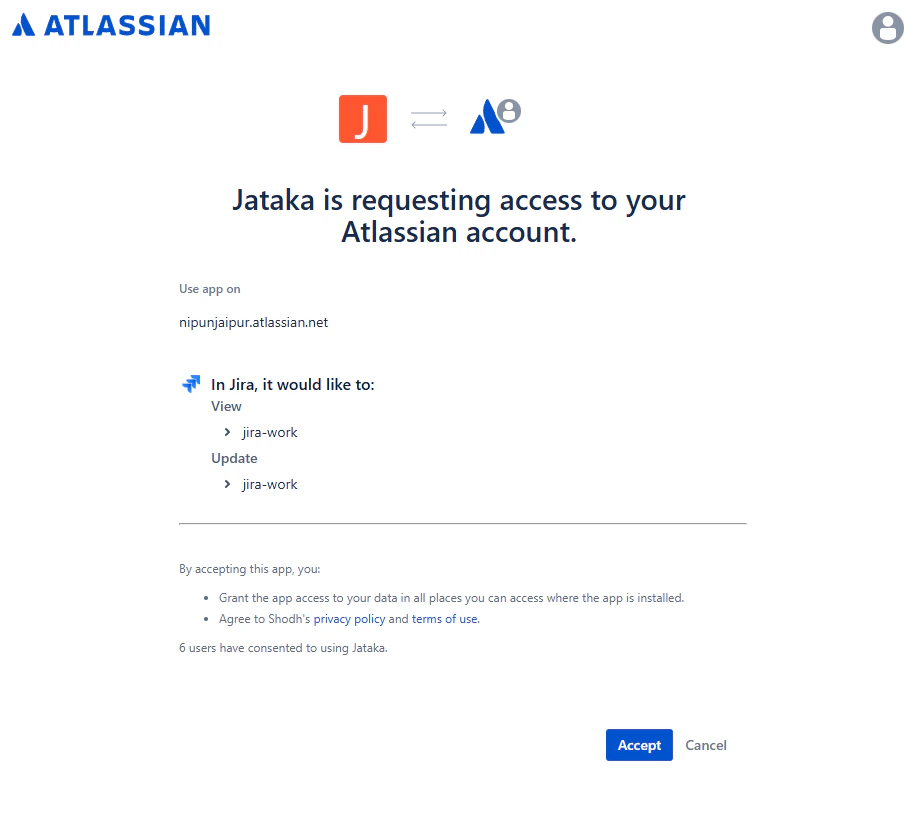
Jataka integrates with Atlassian Jira through standard OAuth 2.0 to connect test execution with project workflows.
This integration follows least-privilege principles and requests only the scopes needed for ticket lookup, automated issue creation, and workflow updates.
 ## Scope Breakdown
* **`read:jira-work`**
* **Plain English:** Read projects, issue details, search results, and attachments.
* **Why needed:** Enables context-aware linking of failed tests to existing work items and prevents duplicate issue creation.
* **`write:jira-work`**
* **Plain English:** Create and update issues, and post comments.
* **Why needed:** Powers automated bug creation and lifecycle updates tied to subsequent test outcomes.
* **`read:jira-user`**
* **Plain English:** View basic user profile information already visible to the authorizing user.
* **Why needed:** Supports assignment and targeted mentions in automation workflows.
Jataka does not require Jira global admin scopes and does not require Confluence access for this integration.
## Scope Breakdown
* **`read:jira-work`**
* **Plain English:** Read projects, issue details, search results, and attachments.
* **Why needed:** Enables context-aware linking of failed tests to existing work items and prevents duplicate issue creation.
* **`write:jira-work`**
* **Plain English:** Create and update issues, and post comments.
* **Why needed:** Powers automated bug creation and lifecycle updates tied to subsequent test outcomes.
* **`read:jira-user`**
* **Plain English:** View basic user profile information already visible to the authorizing user.
* **Why needed:** Supports assignment and targeted mentions in automation workflows.
Jataka does not require Jira global admin scopes and does not require Confluence access for this integration.